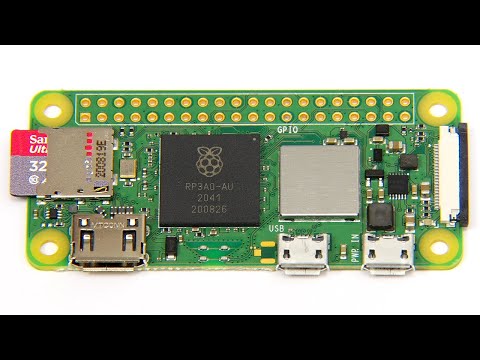
Raspberry Pi Zero 2 W: We have a new Pi!

Raspberry Pi Zero 2 W: We have a new Pi!

????

Raspberry Pi Zero 2 W review, including hardware specification and comparative performance tests. You can find more information on the Raspberry Pi Zero 2 W at: https://www.raspberrypi.com/news/new-raspberry-pi-zero-2-w-2/ Note that this is not a sponsored video, but that the The Raspberry Pi Zero 2 W shown was supplied for review by the Raspberry Pi Foundation. The video has therefore been flagged as a "paid promotion", as I received something "of value from a third party" that allowed me to make the video ahead of the launch on October 28th 2021. More videos on the Raspberry Pi, other SBCs, and wider computing and related topics, can be found at http://www.youtube.com/explainingcomputers You may also like my ExplainingTheFuture channel at: http://www.youtube.com/explainingthefuture Chapters: 00:00 Introduction 00:57 Specifications 05:34 Performance & Boot Test 08:43 Sysbench 10:49 Image Processing 13:30: Wrap #RaspberryPiZero #PiZero2W #ExplainingComputers

Advertisement

LEAVE YOUR COMMENT

LATEST COMMENTS

@williamoftheeldergods Says:
in 2026 the going rate is about 40$ US
@legitimo1788 Says:
Great benchmarks. I've always understimatimated the Zero 2 because the ram didn't increased, but even so it's really a lot more powerful
@JacobWerner-j7u Says:
I wonder if Tinycore is compatible with one of those. they have a 32 bit Rasbery Pi Image on their , but i don't know how much the Pi Model matters in terms of compatibilty.
@Doomslayer151 Says:
Fun fact: AU in RP3A0-AU is stands for Gold in periodic table. Because Raspberry Pi Foundation used gold bond wires in chip to connect RAM to SoC in SiP..
@vps_tunali Says:
Kindly show more applications 🎉
@vps_tunali Says:
👍🎯👌😍🍧🍦🧁🍭🍻from 🇮🇳
@stpnpl Says:
3:50 mini hdmi
@snowcold903 Says:
micro usb 2 is just the worst connector of all time, thats the only negative think about this. the rest is great things with it
@owenbevans6062 Says:
i wish they gave it at least 1 gig ram. Cant browse the internet on it and it's hard to get Retropi and Retroarch up and running.
@JudgeD-hc9vw Says:
thanks Chris. Just found some time in my life to piddle and will be building dual Piholes, redundant,using Pi Zero 2 W. Luckily I have a switch to absorb my many Ethernet demands to accomplish this Also, my provider's router does not allow only one DNS server,therefore the dual Pi Zeros. Cheers.
@khubaib72 Says:
ive been thinking between raspberry pi zero 2 w and orange pi zero 2 w. which one should i get? i already have a pi 5 but i want a zero 2 w for small tasks such as vpn
@pelegkislasi8723 Says:
Hey! A question, how do you go about powering on this raspberry pi? and also what powerbank are you using? (this was 3 years ago, but if you can remember and see this please let me know!) Nice video! (:
@Larimuss Says:
I only wish this had 2gb ram on a wider chip maybe. 😢 it would be such a perfect device.
@SourojitBh Says:
It's a really good alternative for a home pc where you only need to check email and browse the internet a bit, maybe watch videos a bit.
@CapedDumDum Says:
If using with battery power, does Zero 2 W draw more power than Zero W?
@shamssalehin2376 Says:
Can it Run 1080P resolution smoothly, I'm building a UI display using Qt QML requires a 1280x800 resolution for a 8 inch display. i wish it can handle the UI, which may have dynamic animations
@adamwalter2573 Says:
Foundation will probably drop Zero project, so what instead of it ? I would need something open (no blobs!), with similar support as RPI Zero has (buses, interfaces, etc).
@khanbasharat Says:
How does it compare with original raspberry pi zero which you tested 8 years ago
@ThomasDale-w8u Says:
Lueilwitz Mountains
@Tom_P_242 Says:
Did someone know what's kinds of pads are between CORE pad and STATUS_LED pad????? No one show it since today or any forums or schematics when i looked. On official site of raspberry i also find nothing.
@meme5887 Says:
My only complaint is lack of type C
@Caleb-wm2mw Says:
Thank you! The mention of motion pi os was great as well. I will be using one of the Pi Zero 2 W to as the brains for my dash cam and was curious what it could handle.
@amcadam26 Says:
This still feels like the most appropriate raspberry pi. The pi 5 is nice but you can get a n100 intel system for the same price. For learning computing and building gadgets the pi zero is perfect. Looking forward to the zero 3 w.
@digitalmediafan Says:
I've installed the latest bookworm version 64 bit on mine but I can't even run a browser or update and after a short time the W just freezes
@michaelmacgowan9561 Says:
Thank you for this video, it inspired me to buy one to trial for my CS classes. However, I am having a real problem with loading the chromium browser. It takes a long time, much slower than your example. Any ideas why that should be?
@somebody6590 Says:
Hi, totally loved the video throughout, it is extremely informative indeed, just like all the others. But, i would like to recommend that it would be very helpful if you can make a motion ios camera video with this one being compatible as well, for this zero 2 module has a different microprocessor than the zero 1 and thus that video does not work with this module. It would also be great if you can provide me with a solution with my problem where the console just keeps saying "configuring wired network: no device panic: rebooting in 10 seconds(caused by network)". I dont want to connect via ethernet but through wifi itself, would be really happy if you can help me out A bit more specifications: Im using the pi zero 2 w It says a few things in the console after the message and a few above but restarts again and again after a few seconds The first time i tried it, it restarted after 10 seconds, then after rebooting it started after 20, after taking out the sd card and checking everything and starting it, it restarted after 30 second, so like it adds 10 seconds after every time it restarts, just told if it could be useful or worth noting. Thanks!
@petewarby7158 Says:
Great video, as always. I'm waiting on delivery of my Zero 2W and am reading conflicting reports on the best OS to use, seems folk are suggesting the 32bit is better than the 64bit for this board. Please could I ask your thoughts, which would you install on it?
@cyclerical Says:
Don't know how you did those tests without increasing the swap file size from 100M. When I boot the pi zero 2 trashes the swap just booting, maybe the images have got more bloated over the past years?
@nimajokar6989 Says:
tnx so much
@nerdypcbuilder Says:
I sent my pi zero 2 w back and got the orange pi zero 3 4g and it was the best decision I made for sure 👌
@RajveerSingh-vf7pr Says:
G Pie O headers
@An.Individual Says:
I hadn't realised the Pi zero 2 W can run a GUI desktop
@One-Eyed-Willly Says:
yes, i am waiting for the WH variant comes in the main line channels. My vission is jacked to solder and I don't need the kit.
@drrobotsir Says:
Which pi image version are you using? I installed the latest 64bit version and it's slow as hell
@ADITYA_JEENA Says:
here in India all pi boards are at a 100% premium...costs double as to market price of 4-5-15,20 usd....essentially I paid about 12us dollars for pico w...20 for pico zero w (not 2 w)...even more so for pi 4's, is that the case for most people perhaps due to supply chain challenges and low supply/demand ratio
@mihailvormittag6211 Says:
👍
@mauri740 Says:
thank you!
@NETBotic Says:
After years of waiting, I was finally able to buy a Pi Z2W at non scalper prices!
@hirusthehellhound Says:
Wow I would like to have it for my retro pi project
@danielpicassomunoz2752 Says:
They had the chance to drop the microusb connector and missed it :(
@akk5830 Says:
How about video processing
@mb106429 Says:
Post a link to your pharmacogenomics video, I can't find it
@gameexe6337 Says:
how is this video not sponsored if you were sponsored in material form to make this video?
@GroovingPict Says:
DDR2?? I thought I was watching a video from a year ago, not from 20 years ago
@GrahamToal Says:
I don't think running a benchmark that takes advantage of parallelism is a very valid test of the new CPU - the vast majority of programs are single-threaded and even those that use OpenMP seldom get the full benefit that you would expect from running independent processes, MPI style. You could have run the benchmark on the Zero 2 using one core to compare CPUs, *then* run with 4 cores to show the advantage of parallelism when available. It looks like a single-core benchmark would take about 4*16 seconds, so we're looking at something like 65 vs 87 seconds from the faster CPU. Not to be scoffed at, but no-where near the huge speedup your review implies.
@micmac8171 Says:
It costs 100 eur in Germany now!
@growleym504 Says:
$15, huh? Yeah, riiiiiiiiight......
@ant9034 Says:
i am an ant.
@billloveless6869 Says:
Hi, is there a book/manual that you would recommend that list or explains all the commands that are relevant to the Raspberry Pi? Thanks
@partybrawl1764 Says:
For what can it be used?can we do browsing on this?. Van I practice coding?.😯

More Programing Videos