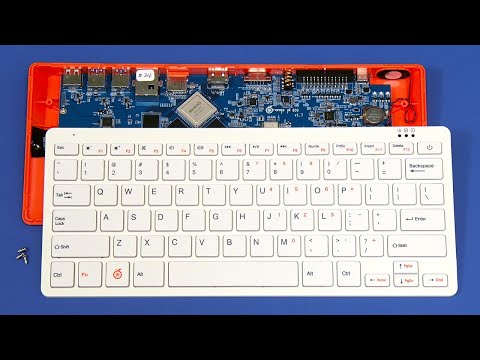
The Orange Pi 800 is an ARM SBC housed in a keyboard, and hence a competitor to the Raspberry Pi 400. This video reviews its specification, takes a look inside, and includes demos and tests running Ubuntu and Manjaro.
The Orange Pi 800 featured in this video was purchased from AliExpress.
You can learn more about the Orange Pi 800 on its web pages here: http://www.orangepi.org/html/hardWare/computerAndMicrocontrollers/details/orange-pi-800.html
My previous review of the competitor Raspberry Pi 400 is here:
https://www.youtube.com/watch?v=P1E5xszQqV8
For additional ExplainingComputers videos and other content, you can become a channel member here:
https://www.youtube.com/channel/UCbiGcwDWZjz05njNPrJU7jA/join
More videos on SBCs and wider computing and related topics can be found at http://www.youtube.com/explainingcomputers
You may also like my ExplainingTheFuture channel at: http://www.youtube.com/@explainingthefuture
Chapters:
00:00 Introduction
00:51 Unboxing
03:04 Specification
07:02 Tear down
08:25 eMMC Boot (Ubuntu)
15:28 VGA SBC
17:30 Manjaro
19:10 Wrap
#OrangePi800 #OrangePi #explainingcomputers
Hi Chris WHAT WOULD I USE MY ORANGE PI FOR? I have a Raspberry pi 400 which has been amazing and I gave this to my grandsons as they are learning coding. It gets used as my daughters household computer. I have ordered an Orange Pi for my work working in a Children's Hospital. It will be used on a TV as a media player and connected to printer and WiFi. It will be used for open source basic gaming and just about as much as any desktop computer as these SBC's are just as capable as spending £100's. Love your channel and content and have learnt so much. Am writing this using Linux Mint on an ancient Dell which I have upgraded using the knowledge you have shared with the world on your channels. Thank You
@hhpatel999 Says:
Sir, despite being inspired by your videos to buy the Pi 400, it keeps disconnecting continuously. Feel like I've wasted my time and money on this setup, so I'm switching back to Windows.
@VirusVanquisher Says:
Ah cool, was just checking out an Orange Pi board on Amazon wondering what kind of projects can be done with them, earlier tonight.
Put together a raspyjack a couple days ago and grabbed a couple extra hats so that I can swap out SD card and have a pwnagotchi, ragnar network audit tool and even a retro game player from same Raspberry Pi zero 2W base.
@Ho-opono Says:
cant find any of these for under 300$ in 2026...
@Rob1-hbgtdd73 Says:
Be a great dos gaming machine.
@greg7282 Says:
It was not disclosed whether Kodi will use software video decoding. In the standard Ubuntu + XFCE image, glmark2 scores only about 150 points, which essentially turns the Orange Pi 800 into a "pumpkin," like Cinderella’s. While the Orange Pi 800 has good hardware, two years after this video was released, no significant new developments have appeared, effectively rendering this device obsolete. Armbian does not support it at all. The hardware is good, but the manufacturer’s support leaves much to be desired.
@ernestlane Says:
Where are the ducks!!!
@DavidJames-d7z Says:
Thanks Chris. A super overview. I might just get one!
@nicholasgarratt5646 Says:
I have had a Pi 400 for years and now have a Pi 500 and this is the first time I have heard of a Orange Pi version of the keyboard.
@Pedro8k Says:
I think raspberry pi are losng the plot this is more like what the pi 400 should have been maybe if they eventually do a pi 600 it might be similar
@Gijs-t7p Says:
What do you mean by eggcetera?
@Tj-Pendley-2026 Says:
I got Manjaro stock from the website to work with yay and learned I can disabled the manjaro and the opi files from upgrade so the 6.0 firmware does not override thus stopping the sd card from booting, but using all the regular updates outside of the kernel configuration, can prolong the xfce tremdously, I wanted to know if you could find a translation software or tutorial, that could make a iso file boot into a img.xz file for etcher, I tried to use joshua riek ubuntu for orange pi 5, but it only supports 3588 not the 3399, but I was thinking if you can get armbian to work, you could get ubuntu server or something prettier to work with this great keyboard PC.
@DaniMartArts Says:
Can it handle MuseScore?
@firsteerr Says:
i 3d printed a capture device to hold a simple mini hdmi to hdmi plug and bolted it to the back making it hard to remove or damage
@andrewdupuis1151 Says:
I cant get password to work
@andrewdupuis1151 Says:
I wanted last few years pi 400 seens i got pi 4 I just got pi 800 as used today its even better
@pleappleappleap Says:
Is the keyboard compatible with the Raspberry Pi 400? The Raspberry Pi 400's keyboard is the same one as the one on the Raspberry Pi Keyboard. You could just buy one of those cheap Raspberry Pi keyboards with your desired keyboard layout and plop it onto the Orange Pi 5.
When I've needed a foreign layout Raspberry Pi 400, which are usually sold out, I've bought a US Raspberry Pi 400 and a foreign layout Raspberry Pi Keyboard, which are almost always in stock.
@hirusthehellhound Says:
If I got one if those orange pi 800 or raspberry pi 400. I would have those as a commodore 64 emulater and have GPIO to control the SID chips for the music
@ecevinece Says:
Can we connect any device via Bluetooth or wifi
@M22018 Says:
are this model support for windows 11 for daily usage, such as, browsing, Microsoft office work and mini video editing ?
@patrpatl Says:
we have the same power supply
@shadowbanned4606 Says:
1:15 how much after additional governmental taxing, you know "for you?"
@DAVIDGREGORYKERR Says:
Guys if you have a System Wide lockup then purchase 4 sticks of 256GB DDR4 Memory modules if you are running RYZEN based CPUs or APUS. if you are running a PC that takes DDR3 RAM then 4 sticks of 16- 32GB DDR3 RAM Memory modules.
@RocketsRule22 Says:
Russo Russo on this one
I miss the crinkle crinkle
And no appearance by Mr Scissors or Stanley the Knife, hope they are doing well Mr Explaining Computers
Btw the appearance by Mr Scrapper nice touch giving him some much needed screen time.
You have an awesome way of doing your videos hope you never change that Mr Barnatt
Take care
@davids9139 Says:
Thanks for this informative video! I just started tinkering with SBCs and I have found your videos most helpful!
@dan8t669 Says:
Keyboard layout kills it for me. The button on top right should never be power.
@michaeljacobus7006 Says:
Is this able to run TwisterOS? Can't seem to find an answer anywhere.
@euphanasia210 Says:
Why don’t companies make this form factor for other computers? It’s super convenient!
@idmnstr Says:
Thanks for the video. Do you feel that it could handle OctoPrint controlling two 3D printers and two webcams?
@furzkram Says:
It seems the OrangePi 800 is no longer available anywhere.
A very shortlived product 😕
Can you find out anything about this?
@beholder2012 Says:
What would we do with such silent computer? It's kind of comeback of home-computer era — just having something really powerful and effective underneath our fingers. While being even smaller/lighter than, say, Spectrum Plus! :)
@ThomasGrillo Says:
Not happy to hear of the micro sd slot. Means I'll have to use the usb dongles again. Looking for an inexpensive accompaniment playback device for rehearsals, that I can hook up to a decent sized monitor in the studio. Not sure how the O/S on that thing will work with me being legally blind, though. Thanks for the video.
@ZLreQMMhgseryvmAVRPAU Says:
I'm Brazilian and always watch this guy's videos. Nice work here mate!
@arturosan010 Says:
Hey. Love your videos. The insight and breadth of your product reviews are very insightful. I enjoy them very much. But I do have to ask, I have not seen you review Beaglboard products. SBC's like the beagle bone black, o AI. Is there a reason to this?
@KMactheFarmer Says:
Man,, what type of keyboard it using? Laptop style?
@mikeparadiso5593 Says:
The right side of the keyboards is different. Enter key, power key, etc.
@mihailvormittag6211 Says:
👍
@skyballs-archive Says:
Tip: You can install Windows 11 on a Orange Pi ARM cpu
It looks like a Raspberry Pi device
@fram1111 Says:
I wish your site had a learning link to drop down all your instructions/learn for everything in that category Spreadsheets, Blender, Python, and so on. I personally would love my core education and refreshing to start with you. I learn quicker and more effectively with you maybe because I like the teacher I don't know why. Maybe it's your style and I think more would follow you if they enjoy it as much as I do.😷 I am way behind on everything and this all start because I wanted more blender learning. But for now, that's it until your next video.
Ps where is the PI 400, and Orange 800 battle specs so we can compare PI to Orgages stat for stat.
One more thing explain and tell how to keep security to the strongest and safest techniques. I know your oonlly one man. 🤣
@rogostep4875 Says:
07:47 It's cool. Many big thx for video!
@valeriarodriguez3444 Says:
I have a question! can these spc's be used with a movie projector instead of a monitor and work the same? I don't have a monitor and preffer to stay that way but I do have a very nice movie projector
@y2ksw1 Says:
How could I have missed this? 😊
@jcp2731 Says:
Questions from someone who knows almost nothing of computors, can this double as a standard keyboard? Ive been interested in getting something like this for web browsing, watch movies and maybe some gba emulation at my offgrid camp, would this work? can this read external hdd of 2TB?
@kyonngowans7091 Says:
You should do a video trying Windows for ARM on it
@ipponyc Says:
Lubuntu would run well on here.
@caesiumtea Says:
Writing this comment on my new OPi 800 right now! Thanks for giving it such an in depth look; this video gave me the confidence to take a chance on a more "obscure" machine like this. (I agonized over whether to choose this or the RasPi 400, and ultimately chose this for the eMMC.)
I wanted a super lightweight computer that I could easily carry in my backpack for the half hour walk to my local maker space, and a few days in, it's working out pretty great! A few hurdles, but they've been manageable. I use it for writing, coding (VS Code), prepping 3D prints in Prusa Slicer, and even a bit of drawing with my Wacom tablet in Krita (and probably soon Inkscape too). One disappointment was that I can't get Blender to run on it at all since there's no OpenGL support--which is an important difference from the Raspberry Pi 400 that I wish I knew about before buying (RasPi 4 does support OpenGL and actually CAN run Blender, albeit slowly). But I'm using it *mostly* for coding and writing, so maybe it wouldn't have changed my decision anyway. I might even use the GPIO pins for some electronics tinkering one of these days!
@twopoint71 Says:
640 x 480 is pretty good. I can remember using Tandy Deskmate in 320 x 240 on my trusty Tandy 1000.
@boobbbers Says:
4:31 did you really need to whip out a carrot?
@drsynthpattern Says:
I wouldn't mind putting this into my pi400 toughcase concept. I would replace the pi400 with this for coading with my kids, retro gaming (batocera etc), Linux everyday applications. The cherry on the top would be if Risc os and Pimiga were implemented into this platform.
@joerinaldi5 Says:
Hi Chris,
Your video is great, and I agree I also didn’t like the mini hdmi ports I really think they were a bad design. The full size hdmi port are much more mechanically sound. Also I am interested in retro gaming emulators. Can you suggest a way to do this..thanks



























LATEST COMMENTS