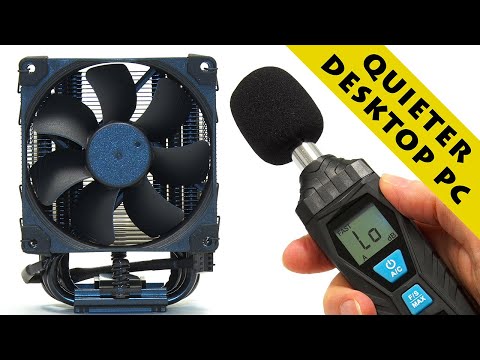
Noctua NH-U9S CPU cooler fitted in the first part of a project to make a desktop PC less noisy. The second and final part of this series is expected to post on April 17th 2022.
A Noctua NH-U9S can be purchased on Amazon.com here: https://amzn.to/36IKmFj and Amazon.co.uk here: https://amzn.to/3uyTe8y Note that these are affiliate links, and that as an Amazon Associate I earn from qualifying purchases when you click on them.
Note also that the above links are to the version of the cooler in its standard colours, not in chromax black. Oh, and do make sure to measure your PC to make sure a 125mm high cooler will fit!
My previous video building a silent Mini-ITX PC is here:
https://www.youtube.com/watch?v=HRJvSux34Hk
Some of videos where I upgrade the desktop PC that I worked on in this video include:
Old PC Upgrade #1: Options & RAM:
https://www.youtube.com/watch?v=2o-p5Wq6MoQ
Old PC Upgrade #2: SSD Boot Drive:
https://www.youtube.com/watch?v=c8BaLpd69QI
Old PC Upgrade #3: USB 3.0 Ports:
https://www.youtube.com/watch?v=hCvQFBRO7UY
Old PC Upgrade: Motherboard & CPU:
https://www.youtube.com/watch?v=sX_yFWKXkz8
CPU Upgrade: How to Change a Desktop PC Processor:
https://www.youtube.com/watch?v=y9pWEEVb9eQ
More videos on computing and related topics can be found at http://www.youtube.com/explainingcomputers
You may also like my ExplainingTheFuture channel at: http://www.youtube.com/explainingthefuture
Chapters:
00:00 Introduction
00:47 Reducing Noise (project overview)
03:55 Cool Hardware
08:07 Installation
15:00 Success? (final tests)
18:26 Wrap
#QuietPC #Noctua #NH-U9S #ExplainingComputers
I love mine. I have it bolted to an i9-13900T (in a mini-ITX build), and I haven't seen the fan go over 1,000rpms yet.
And when I ran Cinebench r23, the CPU package temp maxed out at 62.5°C 👍
@pumelo1 Says:
Because I'm not overclocker,I'm using a 12-year-old cooller, 2 heatpipes, a quality stepped cube with thin ribbing. I changed the fan with useless thin curved lamellas and very high rpm!The best is the technology that ARCTIC COOLING came up with flat, slightly curved lamellas with 1000-2500 rpm.
I can cool the Ryzen 5 5500 at 4.2Ghz just fine and the temperature never even reaches 50 degrees. I have a 20-year-old "PRO station 2002R" case. I'm not demanding and I've been building PCs for 30 years.
I had these tower-cooller when it started only once and got rid of it! I'm old school, started with PC in the 80s, now 50+
@physicstourist8191 Says:
One year ago I built an Intel 11900k system with a be quiet cooler. I used Thermal Grizzly Kryonaut I installed twice completely cleaning the IHS and cold block prior to the second installation. I have had no reason to look at the components since that time.
Today I learn about the Kryonaut scratching problem. I presume that this is over blown but I am unable to find a definitive discussion of what happened and how it was resolved. I find many angry post with speculation about what happened but nothing from any hardware reviewers or from Thermal Grizzly.
I have heard:
The root cause was improper cleaning by users.
Twisting to remove the cooler.
Hard particles that touched the exposed paste prior to assembly
Silver or Aluminum in the paste being pressed into the metal
A bad batch of Kryonaut. I have found post from people who reported problems to TG and they replaced the paste and in one case purchased the customer a new cooler. This may be good customer service but it is being treated as an admission of guilt.
A bad batch that is not being distributed by TG but is available via outside sellers on Amazon and Newegg.
Counterfeit paste
I would really like to understand what actually happened. Is there a definitive write up on this problem. As I understand it the problem started around 2018.
@cestlagvie Says:
Beautiful Channel. Thank you.
@photonboy999 Says:
*CPU FAN config...*
That stock Intel fan could have been far, far quieter if you set an aggressively quiet fan profile. You can likely run 90degC on the CPU constantly. So I would personally have had THREE different ramps. The first is FLAT for IDLE. Whatever RPM keeps you below 60degC. Then ramp from 60degC to 80degC, then a sharper ramp to 90degC at 100% fan RPM. I use the same basic profile regardless of cooler. FLAT in idle. RAMP. Sharper RAMP. FLAT again at 100%.
@phillycheesetake Says:
I like computer cases built just thick enough to accommodate a 5.25" drive, a 120mm at the front, and two 80mm fans at the rear, unfortunately cases like this aren't made any more.
These smaller 92mm towers fit perfectly in such cases, but the 120mm towers don't. Not a problem with the quality 92mm fans available today, but it's understandable how 120mm fans now dominate the market given how awful and droning many smaller fans were throughout the 2000s.
@BeigeAlert Says:
Thanks for this! I've got an i9-9820x that puts out a lot of heat when working hard and the Intel cooler is obnoxiously loud and high-pitched. Worse, even after fiddling with the motherboard settings it still tended to *constantly* rev up and down. I had thought about replacing it with something bigger and quieter but it sounded like too much effort, but after seeing this video I figured seems easy enough. I got an NH-D12L and the temps under full load dropped about 16C and it's nearly silent! The Intel fan was clearly audible from out in the hallway outside the room the computer is in even with the computer idle!
@420bobby69 Says:
Happy to see a new PC build video! Some of my favorite content that you do!
@kaltonian Says:
I was going to say as i don't think people realise the size of some passive heatsinks, the round copper one you showed briefly is about the size of an average football,
@JessicaFEREM Says:
me personally, I would setup a custom curve and set it to not turn the fans on at all until it starts getting warm.
@Bart230 Says:
Always more rather than less, for the thermal paste.
@MarkWhich Says:
I bet you didn't expect it would install this close to your RAM, Idk i be keeping an eye on that or remove 1 RAM Stick.
@Banana85021 Says:
Sometimes you don't have to change the entire heatsink but just the fan if the heatsink is decent but the fan could be of a better model. Depends on what pc and heatsink is used
@dricebaker6594 Says:
Bro what!!?!? This guy is the best!
@N1Zer0 Says:
"Lets apply the magic of film making"
@Eddiereal Says:
A nice PC without any RGB. I thought I was the only one! Lol! A nice sight!
@lawrenceallwright7041 Says:
Christopher, it's really useful that you've listed reminders of the previous upgrades in the section above. 👍🏻
Interesting that you rejected passive CPU cooling because of the additional case fans required. I've usually found that a large case fan (say, 120mm+) tends to be a lot quieter that the smaller ones simply because it doesn't need to spin as fast. That said though, you're not working on the fanciest case in the world, so your locations for case fans appear to be a bit limited.
Never a criticism of what you do of course, and you did show us plenty of alternatives too!
@dogastus Says:
I wanted to make a quiet PC so I got a case from 'Quiet PC'. I'm pleased with it's acoustic quietness but dissappointed with it's radio frequency radiation. It outputs a large number of carriers in the 430 - 440 MHz band which are not present on any other PC I have.
@jierenzheng7670 Says:
Just curious, why not a Ryzen 3600 unless you are using the iGPU?
@user.A9 Says:
Would a standard fan with a voltage reducing resistor be as quiet and cheaper than a noctua?
@32_bits Says:
Nice relaxing video, can't help thinking the days of PC's in metal boxes are numbered.
@retrocomputeruser Says:
Not sure if it's still a threat but Intel CPU's had Minix running even in standby. Google Minix chips so you can read my concern.
@sgkonfetti Says:
The new ITX-3588J: https://en.t-firefly.com/product/industry/itx3588j
@rolandssavdons7993 Says:
Hey, CB! I want to compliment your excellent filming angles! Your production is on par with people who have professional film crews. Keep up the good job!
@OriginalDesudesu Says:
Noctua is very quiet and a good noisegate like the one in adobe audition can do the rest
@bombswabs3041 Says:
Love this program style forgive my appreciation for its retro and more utilitarian style. That why I love it. Just give us the information, less personality and joking around. I love this niche!
@angeleseguin8452 Says:
Very well explained as always!
@dadawoodslife Says:
Very good, but wouldn't it be cheaper to put the PC in a cupboard under the table/bench with some baffles on the air ducts?
@the_shield_wall Says:
The power supply on a ZX81 used to get hot.
@thomasgraf1986 Says:
Another great one Chris! It is so well researched and presented. A help to us every day PC users who don't have water cooled LED monstrosities! Hope the algorithm picks up on your stuff again. Sorry I did not do my part by watching it sooner. Cheers!
@dnoodspodu1159 Says:
16:59 That is The Problem with silencing a PC - once you silence one component, you will begin to audible notice some other. Oh, how the fun just never stops...
@AndrewPendlebury Says:
I’m in awe of how lovely and clean the inside of your PC is!
@briansrcadventures1316 Says:
A good way to fully load a cpu is to use the "stress" application on the command line. My AMD Ryzen 3700x 8 core cpu runs at 74.1C fully loading the system using "stress -c 16" !
@mivact Says:
I had just added a new power supply to my computer and was wondering if I had made the right choice. Getting to the end of your video confirmed I had. Exactly the same make and model. Other than initial start up, I have had no fan noise yet. Thank you for your straightforward, well explained and informative videos.
@michaeljones6256 Says:
Thank you for the video. I have recently fitted my Ryzen 7 5700g system with all Noctua fans and a Noctua Nh-D15S with a second fan fitted to it and it is pretty much dead silent now. Coolermaster N200 case with corsair 450 w PSU. The only downside is that under heavy system use my Samsung 970 EVO plus NVME is reaching 73C. Is this too high?
@lightly-red-huedmaleindivi6266 Says:
The loudest part of my PC is my GPU.
@tianlechen Says:
I got the M1 macbook air because it makes zero noise… and have my NAS and desktop running somewhere else.
@Lukiel666 Says:
So; anyone else just automatically click like on all computer videos to feed the Youtube algorithm and cause it to recommend more computer videos?
@panthony1525 Says:
How can you tell if that blob of heatsink compound has spread across the entire surface of the CPU.
@dpdpdp Says:
Hi, I am planning on doing something similar to my computer. Why did you choose a CPU cooler with 92mm fan? How did you know 120mm fan doesn't fit? Did you measure it? I believe I roughly measured 155mm from base of CPU to top of case? Would be tight fit. Is there much difference between 92mm and 120mm CPU cooler? Thanks for the videos! Do you plan to cover over the holes in the side to eliminate more noise?
@4Simmix4 Says:
could you please change those cables in the pc to all black as well with the psu the current ones with the german flag are really quite offputting for me
@stoyanatanasov8012 Says:
If only I've seen this a day earlier... silly me -_-
@TheDominodoom Says:
I wish I had Mr.Bernatt as my teacher back in my school days. I would've learned a lot more stuff, really lol. I dont know, the way he speaks and explain stuff just makes me wanna learn more 😂
@ProDigit80 Says:
Now swap the HDD for an SSD, and for PSU, you could just open the PSU, and install a curve bladed case fan in it.
Just make sure it's the right voltage, as some PSUs run their fans at 24V, not 12V like most case fans do.
@davidunwin7868 Says:
I would strongly suggest BeQuiet for case fans, they certainly live up to their name. I run these along with a BeQuiet CPU Cooler and they're great. The computer is silent with them running at low rpm to keep air moving and under load they're still very quiet.
@frankfriedlos3721 Says:
Seems a shame to lose the inherent air-flow efficiency of the duct. No?
@fremenondesand3896 Says:
wish there was something done for coil whine when having high frame rates on games.
I've slummed it with some high quality headphones (not noise cancelling) to cushion my head from sound around me.
@tdata545 Says:
OH OKAY, THAT MAKES MORE SENSE. LOL. My PC runs at a quiet 70-80dB of noise when all fans are at 100%. I went with their industrial line since I put a server-grade TRx3990 in my PC with a 3090, but didn't really need to go so all out, since it turns out when both GPU and CPU are max over-clocked (as much as PNY the Graphics Card Manufacture, and ROG/ASUS MB maker, would allow) the temps reach only 50C in a 26C room (I think 26C is 80F, I use F not C, in the US). EDIT: You can technically have TOO little thermal paste. As long as the paste isn't conductive, you can glob the heck out of that CPU. Since any excess would be squished out to the side. They say "pea sized" blob for most CPUS unless Threadrippers, way more than pea-sized.



























LATEST COMMENTS