Cyber Security: Backups & Encryption

Cyber Security: Backups & Encryption

????

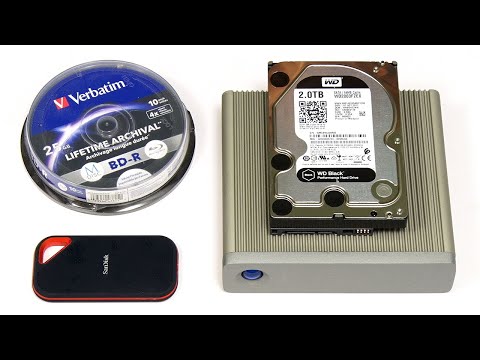
Protecting your data using the 3-2-1- rule, an appropriate mix of personal data storage categories, and encryption as required. The "VeraCrypt Encryped USB Drive" video I mention is here: https://www.youtube.com/watch?v=XshQWFLfwdA And my recent video 'Cyber Security: Protecting Your Online Accounts' is here: https://www.youtube.com/watch?v=uYUfOP4UKSM You can download the free VeraCrypt encryption software from: https://www.veracrypt.fr/ More videos on computing and related topics can be found at http://www.youtube.com/explainingcomputers You may also like my ExplainingTheFuture channel at: http://www.youtube.com/explainingthefuture Chapters: 00:00 Introduction 00:44 The Range of Threats 02:10 Data Storage Categories 04:36 3-2-1 & Beyond 07:01 Backup Media 08:31 Backup Security 09:44 Encryption Options 11:44 Investing Time #Security #Backups #Encryption #ExplainingComputers

Advertisement

LEAVE YOUR COMMENT

LATEST COMMENTS

@sa3270 Says:
For cloud backup, smaller companies that specialize in personal cloud services may be more trustworthy than the well-known big tech behemoths. Optical discs are great for long term archival. Consider a drive that supports M-DISC format. An external USB drive can easily be carried over when you replace your PC. Note that sometimes discs cannot be read on another system unless they have been finalized. Consider buying your optical discs with jewel cases. They'll be much better protected, and you'll be able to keep track of them better.
@anderskristoffersen3270 Says:
Could be updated with thoughts on digital sovereignty and AI
@user-ll5dd7qy2z Says:
Ransomware should b on the first position.
@JHatLpool Says:
Great video. It is good to know which procedures could be adopted by the user. Once in my life, a hard drive completely died on me (in the late 90s). So, lesson learned. Although, I sit here today, surrounded by desktop and portable USB hard drives !
@derekgliddon Says:
Chris, really a big thank you for your superbly planned and produced videos. Good practice videos (like this) enable efficient, reliable home computing experience are beyond invaluable. Your ability to say what needs to be said, no more no less, in an accessible style sets you apart. It's clear you understand your target audience. Keep up the good work. Wishing you continued success.
@Kennephone Says:
I plan on buying an lto 5 or 6 tape drive at some point, you can get used ones for a few hundred bucks, and they can store 1.5/2.5tb per tape, for my use it would be cheaper to buy another hard drive, but the tapes will last a long time and it's another format. I have about 6tb of data, 2tb of it ois just downloaded youtube channels, so I have 4tb to backup
@cesar_onada Says:
I love your videos Mr. Barnatt. They are full of detail and cover a wide range of cases. You could make your videos twice as long and I would still enjoy them. For a non-native English speaker like me, your speaking cadence and diction are very welcome as well. Thank you for your work. Greetings from Spain.
@lukaseichinger2332 Says:
Very good Video, thank you 🎉
@kankanamgamageperera Says:
Perfect teaching. thanks.
@dagance Says:
The best video on YouTube I found on this topic. Instead of just saying "use 3-2-1 rule" with no explanation why, you've actually managed to reason about those things really well. Thanks!
@smaraggi Says:
Could you make a video about differential backups? Some time ago I used cobian backup for that. For backup it is always assumed that the currently "online" copy of the data has not been corrupted, but what if it does and it goes undetectedly copied to newer back ups untile the point in which the data corruption gets propagated to all back ups? This requires differential backup strategy or some sort of versioning control, such as git does with code repositories.
@smaraggi Says:
Great video and topics. Congrats for the very successful channel!
@obayev Says:
Thanks! That’s a very useful information!
@gregh.g.83 Says:
Thanks
@DevotedGamer1 Says:
Great explanation as always
@JustWasted3HoursHere Says:
Chris, I have a question relating to encryption and security and maybe my lack of knowledge in this area prevents me from grasping it fully. On a fairly regular basis we hear about some breach of some company's server where a large amount of personal information has been stolen. So my question is this: Why don't those companies just encrypt the data on their servers so that even if it was downloaded it would be useless to the hackers (without the decryption key(s))? What am I missing here? It seems like a logical and sensible way to prevent these things from happening but no one does it, so there is obviously a reason. What is it?
@ne0ne0 Says:
Thanks a lot for this very well presented video! Exactly for the reasons you mentioned regarding security, I always use restic in combination with naeon to store my backup (chunks) in untrusted environments like the cloud. That way I avoid having to depend on the cloud hosting provider when it comes to proper encryption key management.
@mihailvormittag6211 Says:
👍
@derekp2674 Says:
Excellent advice, thanks Chris.
@Vedrajrm Says:
Where I save my photos and videos 1. Local (phone) 2. External HDD 3. Amazon photos (only photos) [buy prime every one year, back up and cancel) 4. Microsoft one drive (1tb free for students) 5. Instagram 6. Facebook 7. YouTube (only videos) 8. Google photos (stopped backing up new files after the end of free storage) Gonna upgrade to another Hdd and optical drive soon.
@marcse7en Says:
I've STOPPED making backups of my valuable and irreplaceable data! Yes! Really! ... Am I mad? No! ... Instead of making backups, I use a wonderful piece of software called "Synchredible." Using Synchredible I make four copies of my data, so rather than a backup file, I have data itself. As the name suggests, Synchredible synchronises all the copies of my data. It's quick, easy, and so far works like a charm! Since I stopped backing up my data, my data has never been so secure! ... Incidentally, when I leave home, my most important data comes with me, stored on a Flash Drive in my key wallet! ... I never leave home without my keys, ergo I never leave home without my data!
@johnnyc.5979 Says:
Use Microsoft's encryption on your spreadsheet, so only Microsoft and the FBI can read your data.
@sgkonfetti Says:
Topic suggestion: Encryption algorithms
@baozhongimperial3851 Says:
Thanks, really interesting !
@oneeyedphotographer Says:
Fitzroy Crossing, Western Australia, is recovering from floods. The flooded area was vastly greater than the area of Scotland. Make sure that off-site backups are in areas that are not going to share your local disasters such as bushfires, floods, earthquakes, war and other unrest. If you encrypt assets you want to pass on to others at your end of, make sure that the beneficiaries are able to decrypt your files. Same in the event of the sale of your business. Google, Onedrive etc are file sharing facilities, not backup. If you do some photo editing or video work for me, perhaps sharing with DropBox makes sense. What happens if your backup service "in the cloud" goes bankrupt?
@Amanda-f3i1b Says:
I learned to backup my data regularly after 12 years ago I lost all my PS3 games saves 😭😂
@aaron6841 Says:
I really like Corsair flash drives but the plugs aren't very well made.
@rudiansyahsyah9738 Says:
classroom personal data basic symbol commonecation software in sys data com master year 2022 / 2023 🏛🌍🌎🌏🏪🏫🏬🏭🏯🏰💒🏩🏨🏧🏦🏥🏤🏣
@renoholland7090 Says:
Excellent video Sir. As always.
@inquisitive.lurker Says:
Thank you! Subbed.
@NoVanity_ Says:
I agree wit the quote at 2:03 thats why I download the same game twice and install it twice in case I delete the first one I have the backup
@frankenberry9670 Says:
Most fire safes, particularly ones designed and priced for home use are for paper documents. The locked box gets hot, the lining absorbs the oxygen and the paper doesn't burn. Once the fire is over you wait for the box to cool down, a lot, and then open it. If you open it too soon the really hot but unburnt paper immediately combusts. Things that are heat sensitive won't survive so something else is needed.
@pasangamage Says:
This is so far the best video on youtube for data backups
@davidglenn6468 Says:
A good reminder of my first computer studies teacher who always told new students that the first 3 rules of computer management are, backup, backup & backup some more!
@johngangemi1361 Says:
There needs to be more options and research for archival storage that has very slow degradation and high durability. M-Disc is a good start but more is needed.
@johngangemi1361 Says:
The question for creating a backup and archiving plan. How much data, time and money are you prepared to lose? This should be on the front of everyone's mind. Great video as always.
@ianmcleod6428 Says:
I personally keep DATA back ups in HD's, SSD/M.2's in my bank. I also clone them backups in another drives in the bank. I don't trust the "cloud" it's just another persons server.
@utubepunk Says:
My laptop took a dive of only 3 feet and the HDD was *wrecked* . I couldn't even mount it in Linux to copy data off. That HURT. Especially when you're the family IT guy. I've taken measures to remedy the issue in Windows, but I'm not sure how I should be backing up my Linux Mint environment on my dual boot laptop.
@ConfuSomu Says:
Thanks for this informative video! I'll revise my backup strategy to make it safer by including optical media and offsite USB flash drives. These datashur USB flash drives look interesting; I'll check them out.
@ArmenianFenian Says:
I'm thinking of trying to explain the offsite rule to my missus!
@doro8665 Says:
1:38 That is exactly what I did! I, by mistake... Re-Formated my Recovery Drive! I tried to stop it before it could go any further. However, I could not do that by just clicking to stop it. Instead, I had to Disconnect the Power and Pop Out the Battery. And not to forget... I was on Win7... yeah...
@two76s Says:
Thank you for this great video. One thing I've always wondered is how encrypting my main hard drive would affect any backups on or off site. For example, if I do periodic cloud backups, do the backups inherit the encryption? Or do the files need to be decrypted before being transmitted offsite, and then encrypted again there? Same thing for local backups: if I encrypt and then do a backup, how difficult will it be to restore that data later? I want to make a comprehensive backup plan, but I still have a lot of open questions. All these pieces seem to be fine on their own (encryption, backups, etc.) but they get a lot more confusing when you're using them all together. In what order should I backup and encrypt?
@carloseltopoquegira7454 Says:
11:24 if any of these buttons get bad contact or stops working you can't enter password.
@jasonluong3862 Says:
The advantage of using cloud storage, particularly one that you pay for instead of a freebie, is the files are backed up in different versions. I had the need to recover a corrupted file that had been synced to Google Drive recently. It was easy. Simply right-click on the said file, choose recovery to a previous version, choose the appropriate date, and that version was recovered. With that said, having an offline local storage is important too. The thing about backups is the more complicated the regimen, the less likely it will be followed consistently. So the best goldielock routine is using cloud synchronization such as Google Drive and once in a while, make a full copy of the contents of that cloud drive and store that copy locally on an external drive or NAS. This way, there are at least 2 distinct copies without involving a convoluted process.
@allezvenga7617 Says:
Thanks for your sharing
@benvickers6713 Says:
wow a creepy alien is telling me of the 321 rules
@bertnijhof5413 Says:
Good explanation, but I miss the snapshots. I have cheap backups, partly because all storage is lz4 compressed with a compression ratio of ~2.0. Local on-line backups: - My personal data (music; photos; family videos and documents) are stored in Raid-1 with >3 month of weekly snapshots. Local off-line backups: - My 2011 laptop HDD is 2TB, enough to keep the backup of the 2TB storage of my desktop. The laptop is almost always powered off, when I'm not on the road. - I use the remains of a 2003 HP D530 SFF and 4 of my left-over disks in total 1.21TB as backup server. Since Jun 2019 it is in use for ~1 hour/week. Remote off-line backups: - I use the 64GB SD card in my phone as off-line backup for the documents; photos, family videos and for the wma copies of my LPs and CDs. I run all 64-bit computers with Ubuntu 21.10 and OpenZFS 2.0, the 32-bit Pentium 4 HT uses FreeBSD 13.0 and OpenZFS 2.0. All computers keep a number of snapshots, that depends on the storage still available. I keep the free storage between 20% and 30%. The Pentium keeps 2 to 4 snapshots, while the desktop and laptop keep up to ~3 months of weekly snapshots. The 64GB phone backup is maintained monthly by a combination of KDE-Connect and rsync. Once a month OpenZFS runs a complete check of my storage, it repairs any damage in the Raid-1 storage and it documents any problems in the files in the normal storage. I have 2 to 12 power fails per week, so ZFS is essential to avoid or detect silent file corruption or bit-rot. These problems are not handled by ext4 nor ntfs. When I move to Ubuntu 22.04, I consider to encrypt my personal storage on desktop and backups, since that is now fully supported by OpenZFS since April of this year.

@maxsievers8251 Says:
What you are referring to as Linux is actually GNU. Linux is just a kernel.
@Mizai Says:
i backup on a online site on a sd card and on a pc
@queerstudbroalex Says:
A very useful video that I've saved to refer back to later. Thanks!

More Programing Videos